Apps / AirDraw
AirDraw
Paint in 3D with your fingers. AirDraw turns the room around you into a canvas, where your drawings float in real space.

4.5 Stars
300+ Reviews on the App Store
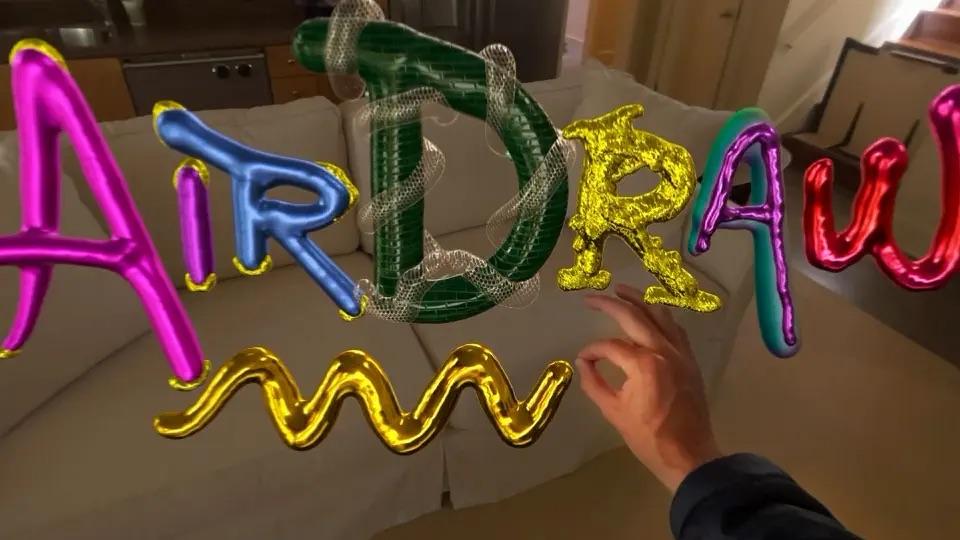
Paint with your fingers
Pinch and move your hand to draw. Strokes appear in the air where your fingers are and stay there as you walk around them.
Your room is the canvas
AirDraw runs in mixed reality, so you see your drawing floating in the real space around you, at any size you like.
Sculpt, Physics and Voxel modes
Beyond freehand strokes, three extra modes give you different ways to build and play with what you make.
Save and share
Keep your creations and share them with other people, including as USDZ files that open in other 3D apps.
See it in action
Where to get it
Apple Vision Pro
AirDraw was one of the first drawing apps for Apple Vision Pro. We built it in the weeks after the headset shipped in 2024, and it is available now on the App Store.
PICO
We are bringing AirDraw to PICO headsets. The store link will be posted here when it is released.
Coming soonRead how we built it in our Apple Vision Pro article, or see our spatial computing development services.
Questions or feedback about AirDraw? Email labs@laan.com